A review of the evidence behind the Age Inclusive Web Standard
This framework did not emerge from assumptions. It was built on research from academic research, policy reports, and the work of people who have spent years documenting what goes wrong when digital services are designed without older adults in mind.
What follows is an account of that research, and why it matters.
The scale of the problem

The starting point was Age UK's Digital Inclusion Evidence Review (Green and Rossall, 2013). The finding that stayed with us: adults aged 75 and over are more than five times more likely not to use the internet than those aged 55 - 64.
That is not a small gap. It is a structural one. And it compounds. As people age, the services they need most - healthcare, benefits, housing - are increasingly only available online. The less confident someone is digitally, the more they are pushed toward channels that no longer exist, or penalised for using them.
That insight sits behind every guideline in this standard.
Cognitive load is not an abstract concern
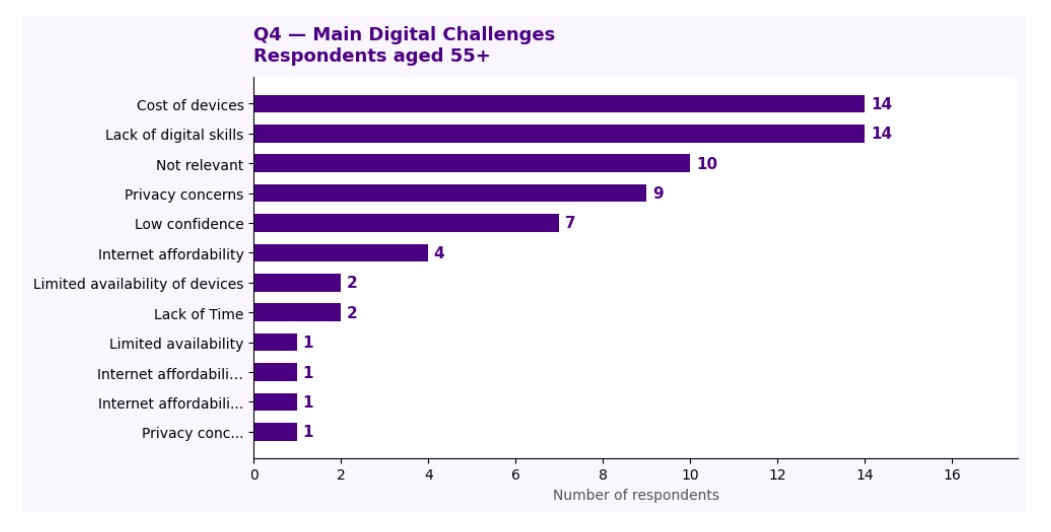
Research published in Frontiers in Psychology made clear what many practitioners already suspect: interfaces that feel fine to a designer in their thirties can be genuinely exhausting for someone experiencing age-related changes in attention and memory.
The research is direct. Interfaces should be easy to learn, support task completion, and minimise unnecessary cognitive demand. Clear visual hierarchy is not a nice to have. It is the difference between a service someone can use and one they abandon.
This is the evidence behind AIWS-06 : reducing complexity and avoiding information overload.
A separate study on ageing and technology access identified the specific cognitive changes that affect digital interaction:
- Reduced working memory capacity
- Decreased attentional control
- Difficulty switching between multiple pieces of information
- Increased sensitivity to cluttered or visually complex interfaces
These are not edge cases. They are normal features of ageing. Designing around them is the baseline, not the ambition.
It is not just about age
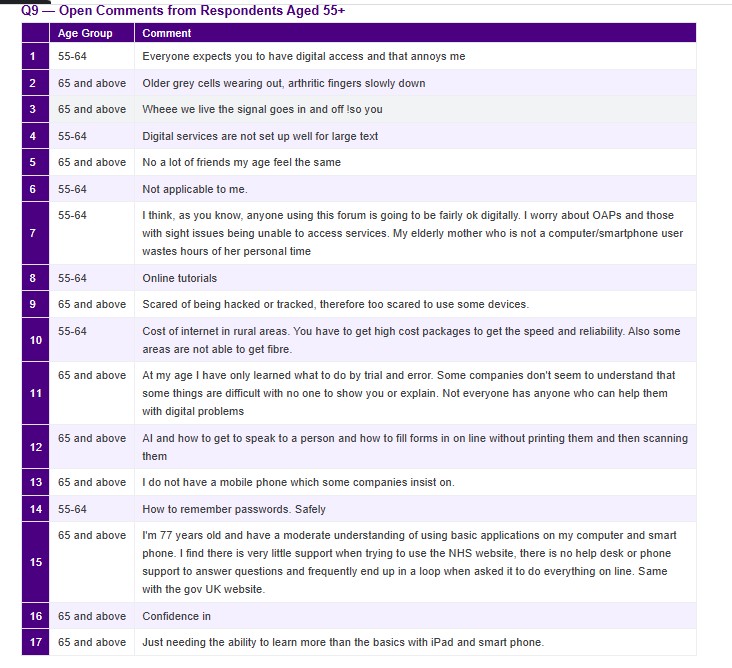
One of the more important findings from the research is that age alone does not predict digital exclusion. The picture is more complicated.
People living alone are 1.75 times less likely to use the internet than those in multi-person households. Those with very poor self-perceived health are 2.15 times more likely to be offline. Social context, confidence, and health all shape how someone relates to digital services, often more than chronological age does.
This matters for how we design. A service that assumes all users aged 65+ share the same needs will fail many of them. The goal is flexibility, services that can accommodate varied circumstances, not just varied ages.
Digital by default is not working for everyone
The Age UK Offline and Overlooked report and related Policy Exchange research documented something that should give pause to anyone involved in public service delivery: a significant proportion of older people still prefer telephone or in-person support, even when a digital alternative exists.
That preference is not irrational. It reflects trust, familiarity, and often a history of digital services that did not work well for them.
AIWS-11 exists because of this. Critical information and routes to access must remain available outside digital only channels. That is not a concession. It is a requirement.
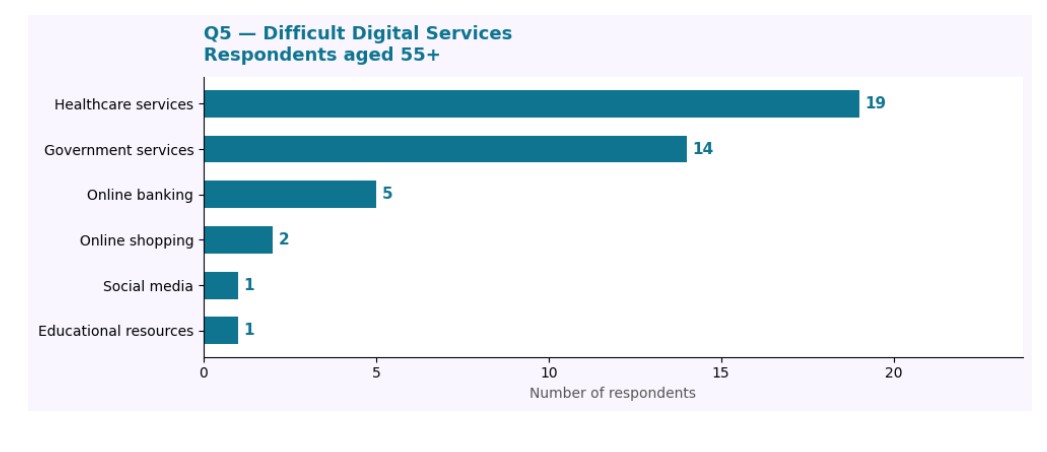
Research into how older adults experience online forms identified a familiar set of failures:
- No clear summary of what the form requires before users begin
- Too much competing information on screen at once
- Insufficient guidance on how to complete individual fields
- Help content that is either absent or too complex to use
These are not obscure edge cases. They are the default state of most government forms. And they land hardest on users who are already less confident.
This research shaped AIWS-04 (support visibility) and AIWS-05 (do not move, animate, or interrupt content without user initiation). It also reinforced the case for embedded, contextual guidance. We should have help pages buried three clicks away.
Anxiety is a design problem
Nielsen Norman Group's guidance on error messaging and deceptive design patterns pointed to something that does not always get named directly: digital interfaces can generate anxiety, particularly for users who already feel uncertain.
Error messages that blame users. Visual tricks that push people toward choices they did not intend to make. These patterns are common. For older adults with lower digital confidence, they are not just frustrating, they can end the session entirely.
AIWS-17 addresses tone directly: clear, neutral, non-judgemental language throughout. Not as a stylistic preference. As a requirement.
What the evidence adds up to
Across every source reviewed, the same themes kept returning:
- Cognitive load must be minimised (AIWS-06, AIWS-10)
- Memory demands should be reduced through clear structure (AIWS-05)
- Interfaces must be consistent and flexible across devices (AIWS-03)
- Support must be visible, contextual, and easy to reach (AIWS-04)
- Critical services must exist outside digital-only channels (AIWS-13)
- Language must remain clear and non-judgemental throughout (AIWS-17)
One thing the research makes clear
Older adults are not a uniform group. Digital exclusion is shaped by age, health, confidence, household, and history. A framework that treats all users over 65 as identical will fail most of them.
The goal here is to focus on aging users, but still recognise that good design can be complicated. Ultimately, the goal is to design services flexible enough that no one is excluded when the digital channel does not work for them.
Age inclusive design is not something to retrofit. The evidence has been there for years. This standard is an attempt to act on it.
All sources referenced above are publicly available. For questions about the research methodology behind this framework, use the contact page.